
ProductBay is a WooCommerce product table plugin built to solve grid complexity and individual pages problem. It replaces the standard product grid with a fast, interactive table layout. Customers can scan your entire catalog at a glance, filter and search in real time, manage quantities, and add products to cart from a single structured view.
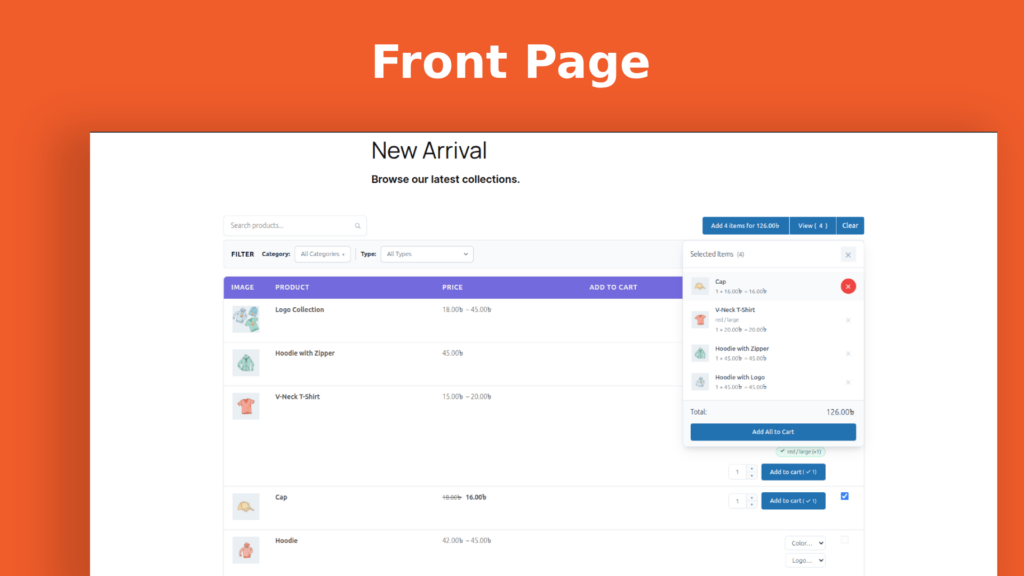
Standard WooCommerce grid is holding your store back. Your customers arrive knowing what they want. They need to compare options, check a SKU, glance at stock status, and add to cart. Instead, they encounter a grid of cards. They click into individual product pages, navigate back, lose their place, and start over. Every unnecessary click is a moment where attention slips and carts go empty.
ProductBay is the solution to this problem.
Why Use a WooCommerce Product Table?
The product table layout is not new. Wholesale distributors, B2B suppliers, and catalog-driven retailers have relied on it for years, precisely because it works. A well-designed WooCommerce product table surfaces the information that drives purchasing decisions. Price, stock, SKU, and variants are all visible at once, without requiring the customer to dig for them.
However, what has been missing is a WooCommerce solution that executes this layout at a modern standard: fast, flexible, visually polished, and built for the way stores actually operate. ProductBay is that solution.
Built for Performance from the Ground Up
ProductBay is not a legacy plugin with a new coat of paint. It uses a hybrid architecture that delivers performance at every layer.
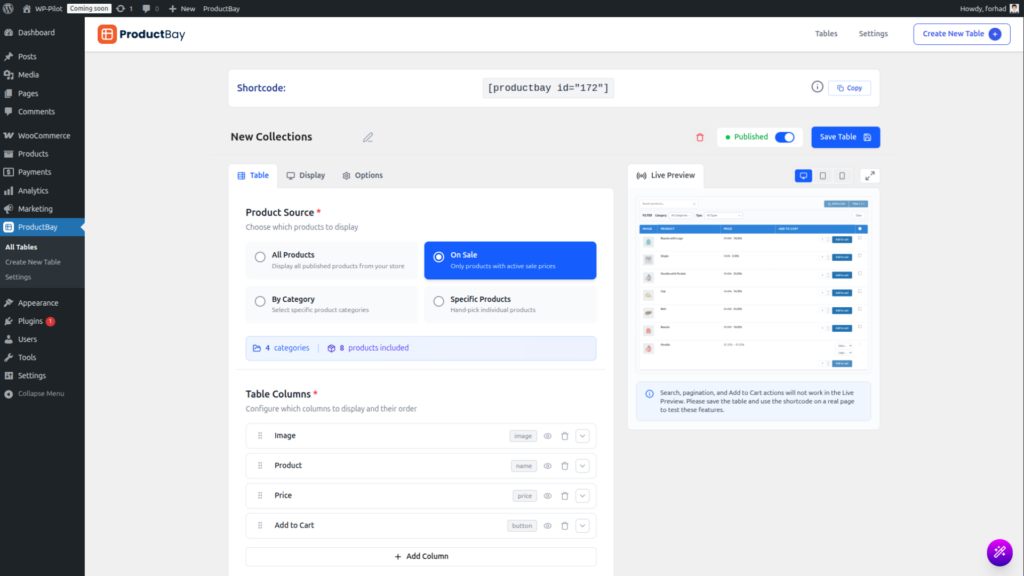
A Responsive Admin Panel
The admin panel is a fully responsive Single Page Application (SPA). Stacks include React 18, TypeScript, and Tailwind CSS v4. As a result, managing your tables feels immediate and intuitive, with no sluggish page reloads.
A Lightweight Frontend Engine
The frontend display is a separate, lightweight rendering engine optimized for Core Web Vitals. Assets load only on pages where a product table shortcode is present. Furthermore, product queries are cached for thirty minutes using a stale-while-revalidate pattern. This minimizes database load without sacrificing data freshness.
All JavaScript and CSS assets are bundled locally within the plugin. No external CDN dependencies are loaded on your store, and no data is sent to any external server.
Everything You Need to Build the Right Table
A Guided Creation Wizard
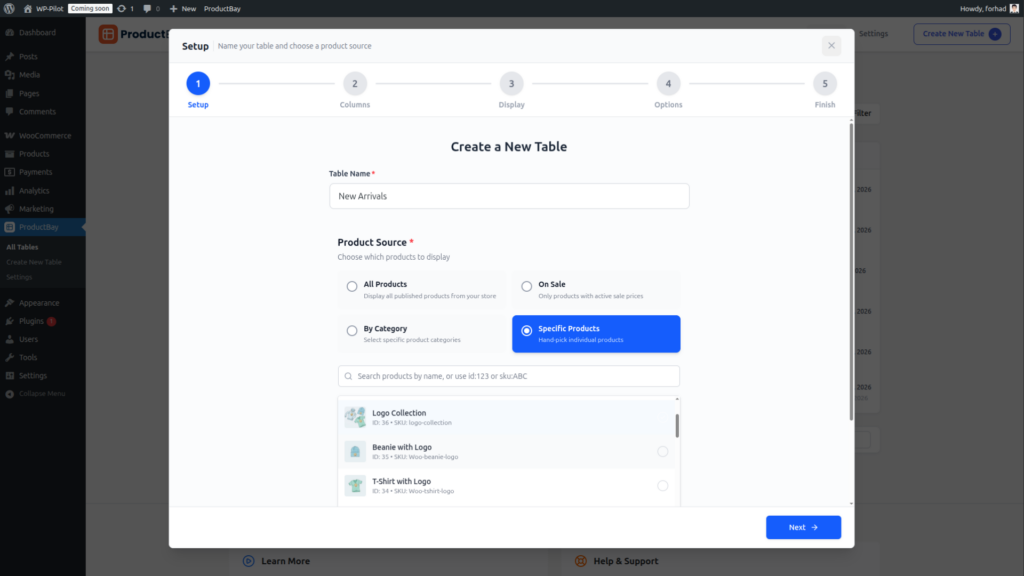
Getting a WooCommerce product table live should not require technical expertise. ProductBay’s five-step Creation Wizard guides administrators through the full setup process: naming the table, selecting a product source, configuring columns, customizing the design, and generating a shortcode.
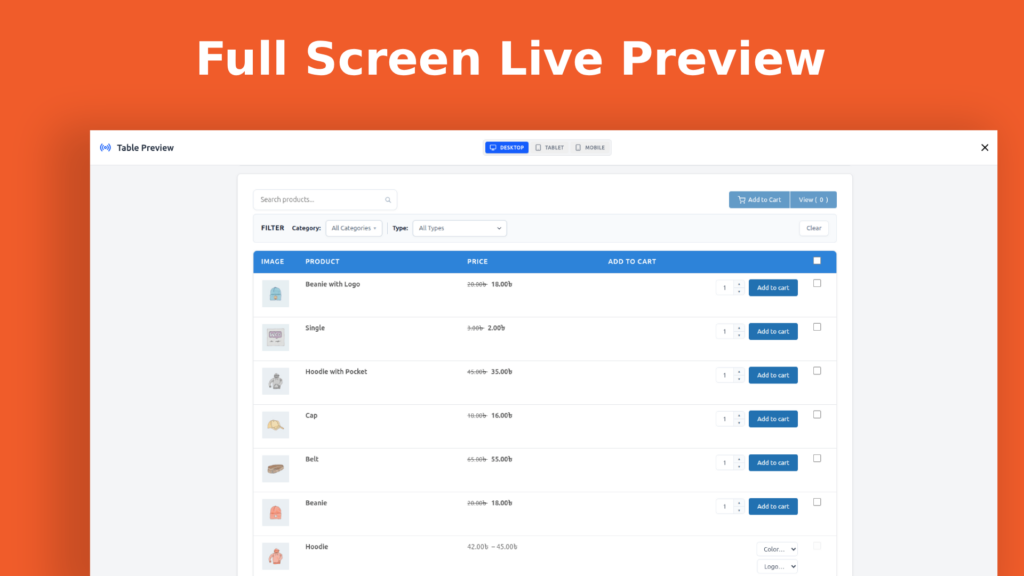
A real-time live preview updates as you make changes. So you see exactly what your customers will see before publishing anything.

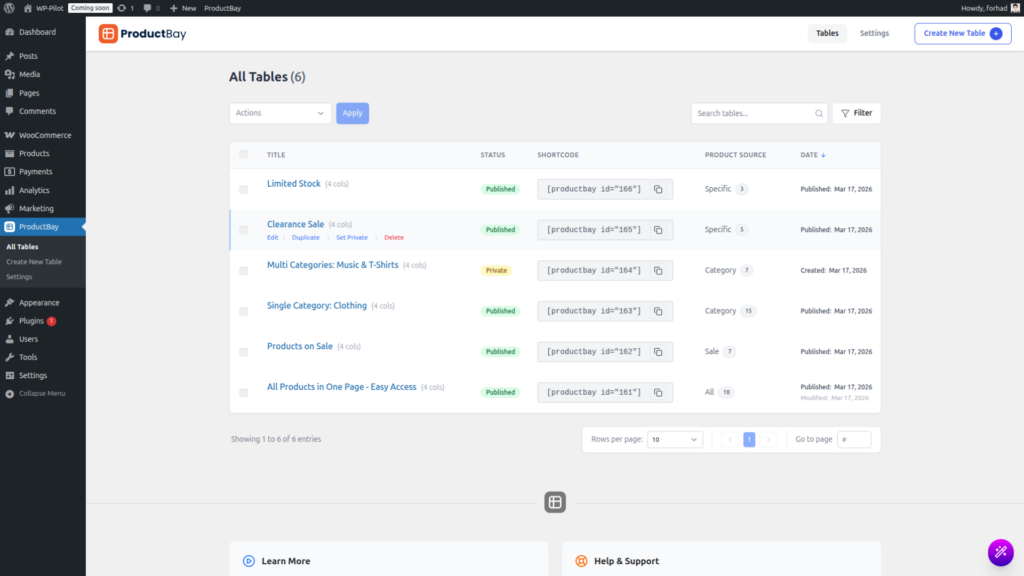
When you complete setup, a shortcode is instantly generated, for example [productbay id="1"], ready to paste into any page, post, or widget. The whole process takes minutes, not hours.
Flexible Product Sourcing
ProductBay gives you precise control over which products appear in each table. You can choose from four source types:
- All Products: Display your entire catalog.
- By Category: Scope the table to one or more product categories.
- Sale Products: Show only items currently on sale.
- Specific IDs: Hand-pick individual products for curated displays.
In addition, query modifiers let you refine results further. You can exclude specific product IDs, filter by stock status, or set price range boundaries. Additionally, default sort order is configurable per table, with options for name, price, date, or popularity.
A Powerful Column Editor
The column editor is where ProductBay’s flexibility becomes clear. Columns are reordered by drag-and-drop, renamed to match your store’s language, and individually configured for responsive visibility. Moreover, ten granular show/hide modes let you control which columns appear on mobile, tablet, and desktop. This ensures a clean however appropriate layout on every device.
Available column types include Image, Name, Price, SKU, Stock Status, Short Description, Date, Taxonomy (categories, tags, and attributes), Custom Fields, and also Combined cells. Width controls support Auto, Pixel, and Percentage values for precise layout management.
Full WooCommerce Product Type Support
ProductBay handles the full range of WooCommerce product types without compromise:
- Simple products render cleanly with a direct add-to-cart button.
- Variable products expose attribute selectors inline within the table row. Customers can select size besides color, or any custom attribute without leaving the table.
- Grouped products and External/Affiliate products are each handled with appropriate display logic.
AJAX Cart Integration and Bulk Selection
Every add-to-cart interaction in ProductBay is handled via AJAX. Products are added to the cart instantly, without a page reload. This keeps customers in the flow of browsing rather than interrupting it.
For wholesale and high-volume scenarios, the bulk cart features are particularly valuable. Customers can select multiple products simultaneously and review their selections in a floating Selected Items Panel. Simultaneously this panel displays individual quantities, pricing, and remove controls. When ready, they can add everything to cart in a single action.
A “Clear All” control allows selections to be reset instantly. Importantly, selections persist across page navigation and reloads, so customers never lose their progress. Variation badges also provide visual confirmation of which variants were added, synchronized natively with the WooCommerce cart.
Frontend Search and Filtering
ProductBay includes an instant search field that filters the WooCommerce product table in real time. It also ships with a full suite of configurable frontend filters:
- Price Range Filter: A dual-handle slider, numeric min/max inputs, or both. Thus price bounds can be auto-detected or set manually.
- Product Category Filter: A native dropdown for filtering by category.
- Product Type Filter: Allows customers to narrow results by product type.
All filters operate via AJAX. Therefore, the table updates without a page reload, keeping the browsing experience seamless.
Deep Design Customization
Every ProductBay table is fully customizable. Crucially, each table’s styles are instance-scoped. CSS blocks are isolated per table, which means multiple tables on the same page will never conflict with each other’s styling.
Within each table, administrators can control the following:
- Header and body background colors, text colors, font sizes, and font weights
- Zebra striping with custom alternating row colors
- Border style (solid or dashed), border color, and border radius
- Cell padding density (Compact, Normal, or Spacious)
- Row hover effects for background and text color
- Button colors, border radius, and cart icon styling
- Image Lightbox: a native modal for full-size product image viewing, built on browser resources for maximum performance
Shortcode Simplicity
Deploying your WooCommerce product table requires no technical knowledge. Once a table is created, its shortcode can be embedded in any Gutenberg block, classic editor field, page builder widget, or WordPress widget area. Furthermore, multiple tables can coexist on the same page without interference.
An Extensible Foundation for Developers
ProductBay 1.0.1 introduced a comprehensive extensibility API with over thirty action hooks and filters. These are distributed across the plugin’s Core, Data, API, Frontend, and Admin layers. As a result, developers can modify query arguments, alter rendered output, inject custom styles, extend REST endpoints, and hook into cart events, all without modifying plugin files.
Full hook and filter documentation is available on the developer reference page within the WordPress admin.
Who Is ProductBay Built For?
ProductBay is particularly well-suited to store types where the standard WooCommerce grid creates genuine friction.
Wholesale and B2B stores benefit from the bulk selection workflow, inline quantity management, SKU visibility, and stock status columns. Together, these give buyers all the information they need to place a large order efficiently.
Catalog-heavy retailers can deploy multiple scoped tables by category, sale status, or hand-picked selection. They can embed these tables across different pages to create structured, navigable browsing experiences.
Stores with variable products benefit from inline attribute selection. This eliminates the need to navigate to individual product pages simply to choose a size or color.
What Is Coming Next: ProductBay Pro!
The Pro version that extends ProductBay’s capabilities for stores with more advanced requirements. The roadmap includes the following features:
- Advanced Variation Interface: A dedicated popup or nested row mode for variation selection, with AJAX-loaded content for optimized page speed
- Pro Columns: Additional column types including star ratings, review counts, dimensions, weight, sales volume, discount badges, and a standalone quantity column
- Lazy Loading: Infinite scroll or a Load More button as an alternative to traditional pagination
- Advanced Filters: Additional filter types including attribute filters, rating filters, and active filter chips with individual remove controls
- Quick View: An AJAX-powered product modal triggered directly from the table
- Custom CSS Editor: A per-table, scoped CSS editor with syntax highlighting
- Responsive Modes: Stack Cards and Accordion layouts for optimized mobile presentation
- Import and Export: JSON-based table configuration backup and migration
- Analytics: Impression and click tracking with a dashboard summary panel
- Premium Templates: One-click style presets for rapid visual setup
Get Started with ProductBay
ProductBay is available now on the WordPress Plugin Directory. Installation takes under five minutes. The Creation Wizard then guides you to your first live WooCommerce product table with no configuration files to edit and no theme code to modify.
Requirements:
- WordPress 6.0 or later
- WooCommerce (installed and active)
- PHP 7.4 or later
Download ProductBay Now: https://wordpress.org/plugins/productbay/
ProductBay is developed by WPAnchorBay. Visit wpanchorbay.com to learn more.