

TubeBay, YouTube for WooCommerce product pages
Show your products with videos, without the speed tax.
TubeBay puts your YouTube videos on product pages with a facade that loads roughly nothing until a shopper clicks play. Your channel syncs itself, daily.
Free core, no hidden limits.
Installs like any plugin, connects your channel in minutes with secure OAuth.

~0 KB of scripts until a shopper clicks play
24 hrs automated channel sync
100% free core, no hidden limits
Fast, automated, clean.
Every embedded video should have been on WooCommerce.
Video without speed cost
The facade keeps pages light: ~0 KB of YouTube scripts until a shopper actually clicks play.
Fast, secure channel setup
Connect your YouTube channel with OAuth. No copy-pasting video links one by one.
Daily auto-sync
New uploads appear on your store automatically, every 24 hours, zero busywork.
Smart API caching
YouTube data is cached intelligently, so pages stay fast and your API quota stays safe.
Better product pages
Show, don’t tell: real videos answer questions a gallery image can’t.
Clean uninstall
If you ever remove TubeBay, it leaves your database the way it found it.
Watch it work on a real store.
Actual recordings of TubeBay in action, not mockups.
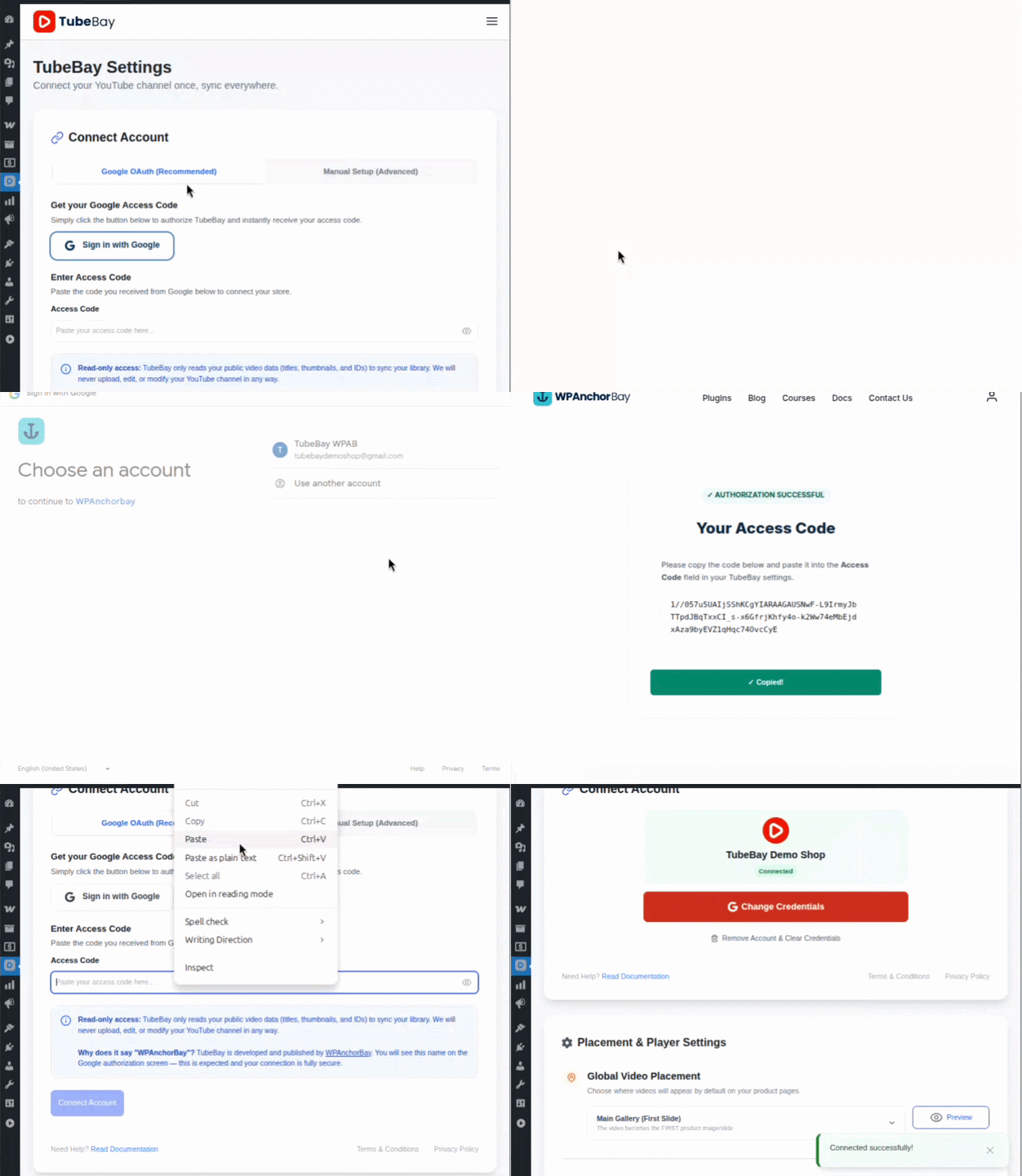
Browse your channel in WordPress
Pick videos for product pages without leaving the admin.
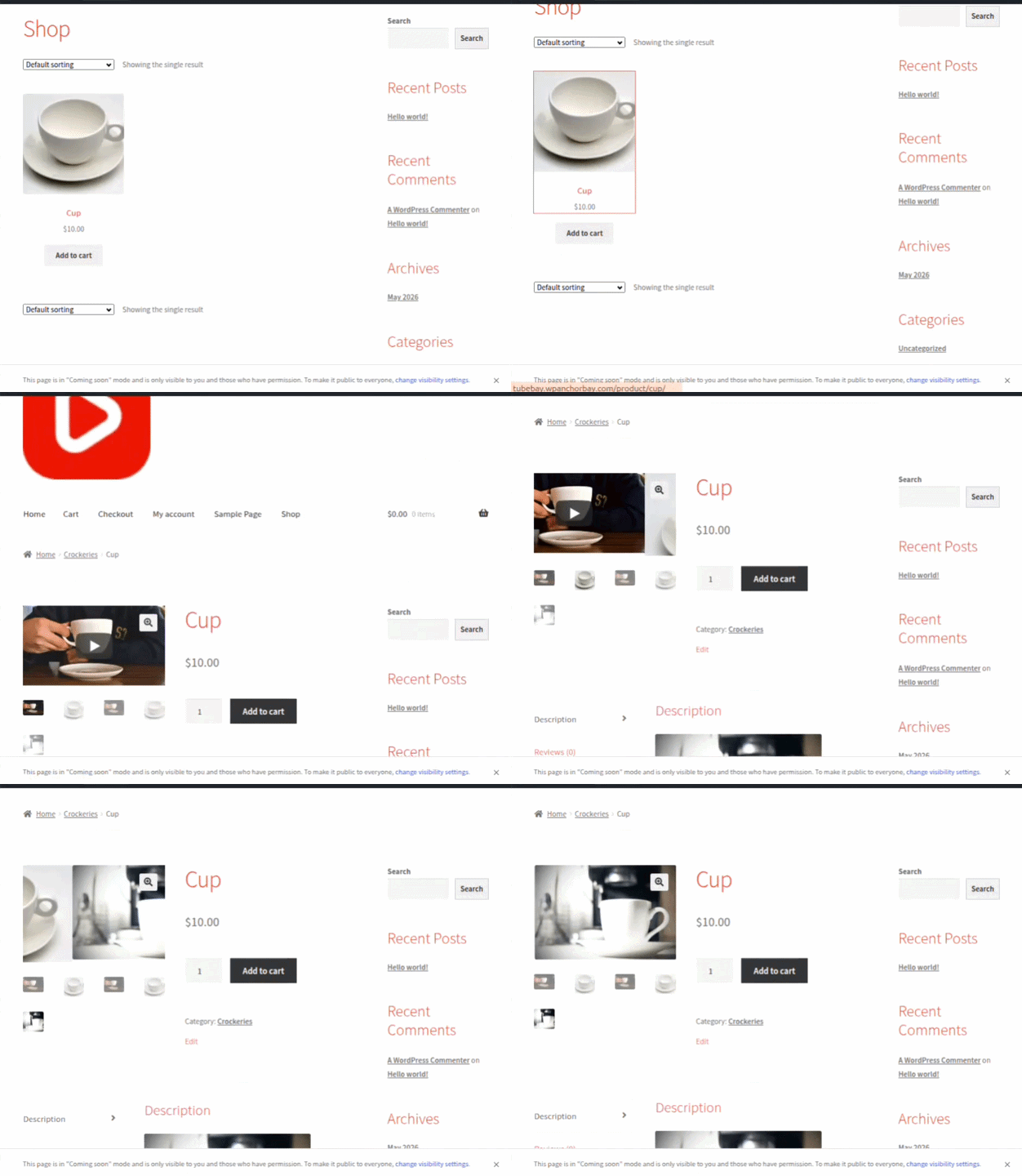
Videos on product pages
The facade shows instantly; YouTube loads only on play.
Plugin Inside
Official screenshots from the TubeBay plugin on WordPress.org.

Onboarding
Welcome, start the TubeBay setup wizard

Setup
Setup wizard, connect via Google OAuth

Setup
Setup wizard, manual channel ID and API key

Settings
Settings, manage the connected YouTube account

Library
Channel library, manage and preview synced videos

Settings
Placement, autoplay, controls, and sync settings

Editor
Assign a video from the WooCommerce product editor

Storefront
Product videos shown in the WooCommerce gallery
Connected in three steps.
Install free
Grab TubeBay from WordPress.org and activate it.
Connect & verify your channel
Secure OAuth sign-in, no API keys to hunt down.
Stay in sync
Videos land on your store and refresh automatically every day.
Start free. Go Pro from $39 a year.
The free version is a real foundation, not a teaser. Pro adds more power and column customizations.
1 Site License
Solo store growth
- All Features Included
- One Year Plugin Update
- One Year Priority Support
5 Sites License
Multi-site value
- All Features Included
- One Year Plugin Update
- One Year Priority Support
10 Sites License
Agency powerhouse
- All Features Included
- One Year Plugin Update
- One Year Priority Support
1 Site License
Effective solution for solo business owners.
- All Features Included
- Lifetime Plugin Update
- Lifetime Priority Support
5 Sites License
A cost-effective plan for small teams running multiple websites.
- All Features Included
- Lifetime Plugin Update
- Lifetime Priority Support
10 Sites License
The ideal plan for agencies handling numerous projects.
- All Features Included
- Lifetime Plugin Update
- Lifetime Priority Support
Lifetime · pay once — One payment, updates and support forever. No renewals.
The questions store owners actually ask.
Won’t YouTube embeds slow my product pages down?
Normal embeds do. TubeBay uses a facade: the page shows a lightweight preview and loads YouTube’s player only when a shopper clicks play, so it costs roughly nothing until then.
Do I need to be technical to set it up?
No. You sign in to your channel with OAuth in a guided setup. No API keys, no embed codes, no shortcodes to memorize.
Is it really free?
Yes. The core plugin is 100% free on WordPress.org with no hidden limits.
What happens when I upload new videos?
TubeBay syncs your channel automatically every 24 hours, so new uploads appear on your store without any copy-paste.
What if I uninstall it later?
TubeBay cleans up after itself and leaves your database the way it found it.
Give your product pages video today.
Free, light, and automatic. Your channel does the selling while your pages stay fast.
100% free core · Secure OAuth setup · Auto-sync every 24 hours